
Updated: April 2, 2026
Welcome to my honest review of List Impact
In this review we will be looking at List Impact, owned and maintained by Kenny Kolijn. We will examine how this mailer works, take a look at the home page and how to set up your account, We will also visit all the membership options available, how to set up your ads, learn how to send emails to members, the affiliate program, the pros and cons of the platform and finally some frequently asked questions to see if this can help you with your online business.
How does it work?
When you first log into List Impact you will notice that the site has a padlock in the URL bar meaning that the site is secure and has a valid SSL Certificate.
On logging on you may be promoted with a OTO, this varies from month to month.
I would advise not to upgrade yet until you have fully explored List Impact to see if you could utilize this for your business.
Scroll down to the bottom of the page and click on no thanks, this will take you to a log in ad which another member has paid for.
After 10 seconds of viewing this ad you can claim credits, or you can skip the ad and go straight to the members area.
[Tip…if you visit List Impact everyday I would recommend to wait for 10 seconds and claim the credits as these will mount up over time].
Click on continue to the members area to enter the platform.
The List Impact Home Page.
On the left-hand side you will find the List Impact dashboard, and to the right of this the main information screen.
Here you can check how many credits you have, when you can send an email, how much commissions you have and the number of referrals you have.
How to set up your account.
STEP 1.
Complete your account information by adding your first and last name. As this is a mailer you will want to add an email address where emails will be sent to.
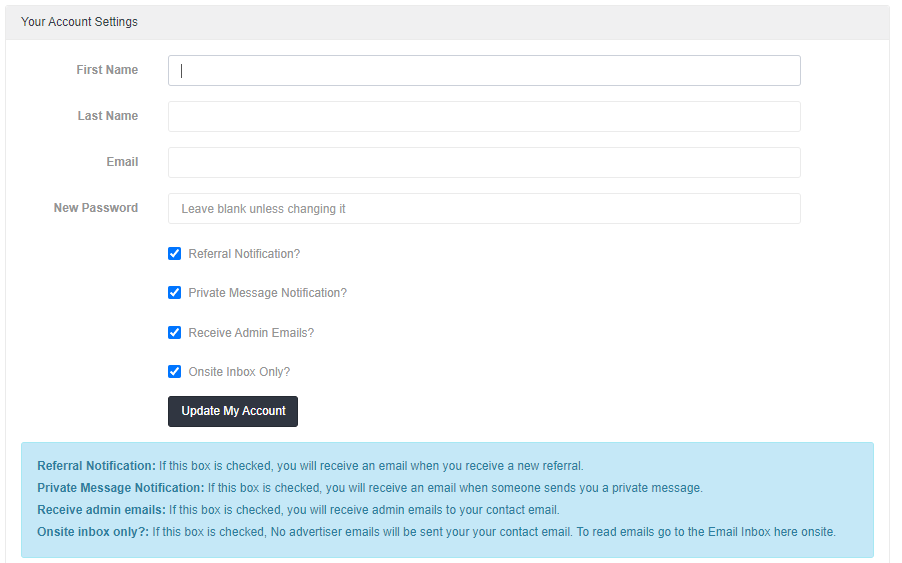
[Tip…As you will receive a lot of emails make sure this is not your primary email address].
HOWEVER you can also tick the checkbox that says on-site inbox only.
STEP 2.
Complete your profile page. Your picture and link to your profile will automatically be included in any email you send. This is an EXCELLENT way of getting extra exposure!
STEP 3.
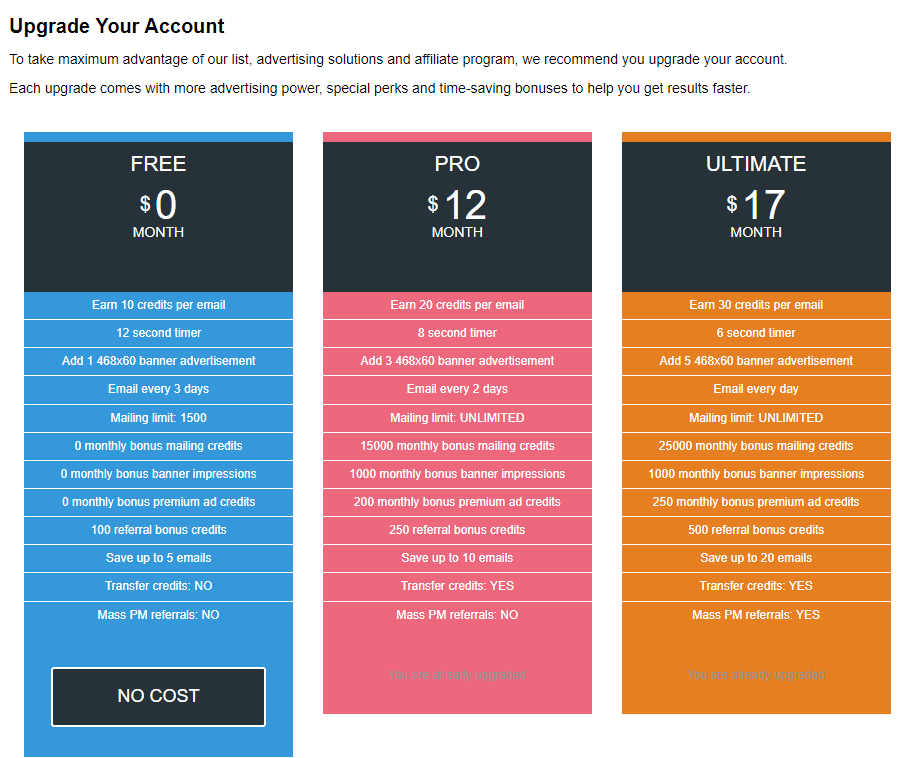
You can upgrade your account for extra benefits, (email more members more often, monthly credits, monthly banners and premium ads, higher commissions, add more banners and PM your downline).
A comparison of upgrades are shown in the table below.
STEP 4.
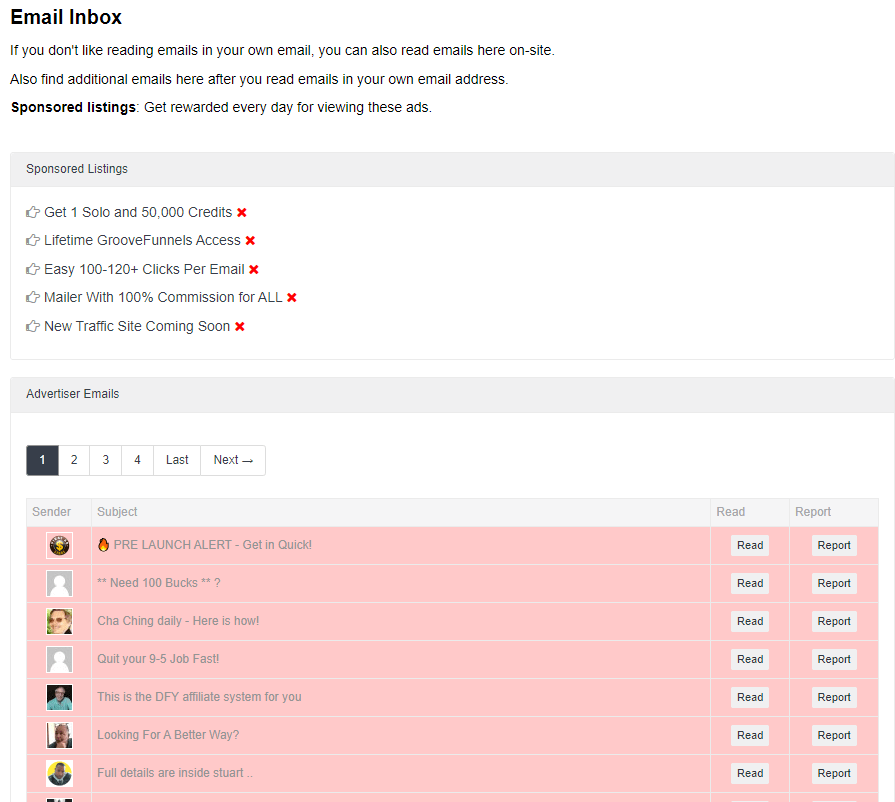
You gain credits by reading the emails sent by other members. All you have to do is to click the credit inside each email to receive credit for reading the email.
After you click the credit link, wait for the timer to countdown. Read all the emails? You can view extra recent emails in your email inbox.
At the top of the email in box there are sponsored ads which you can also view. These will give you extra credits and banner ad impressions to use. You can click on theses every day.
STEP 5.
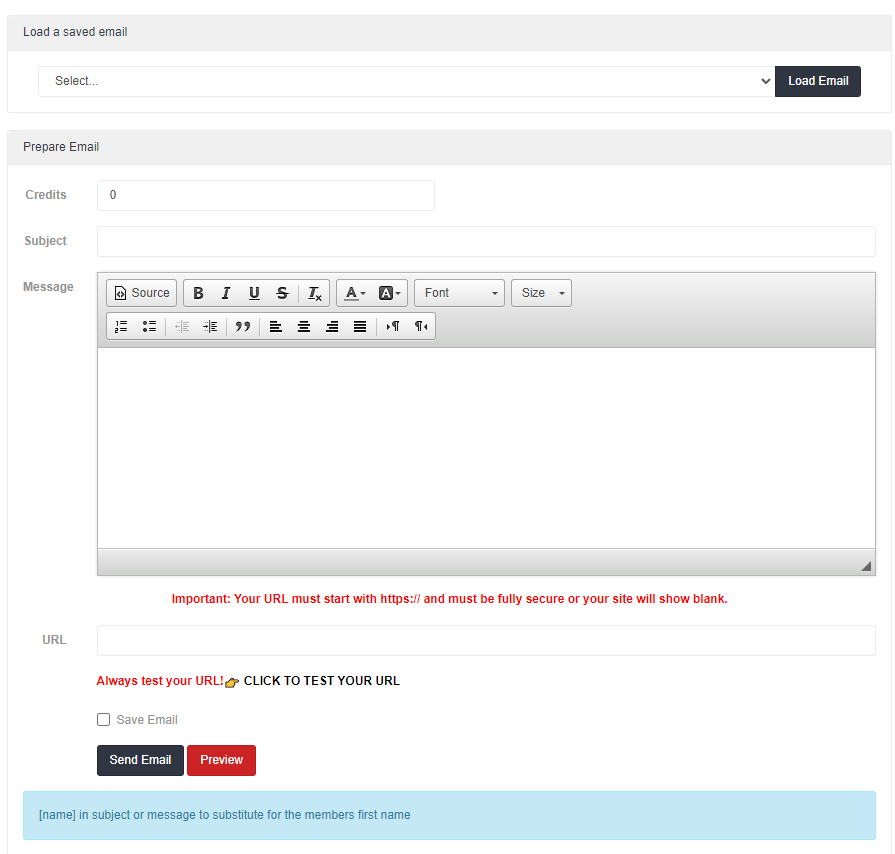
Send your first email by going to email >> send email. You use credits to send emails I credit = 1 email sent.
[Tip…always send to a large number of people. Sending to a small number will not produce much results].
At any given moment List Impact will show you how many available members there are and how many credits you have available. It will also give you extra members reading on-site only (no credits are used for this).
List Impact will also show you offers that have just launched and tips and information on how to maximise your emails when you send them.
STEP 6.
You can promote List Impact with your affiliate tools to earn commissions from your downline and unlock bonuses.
Affiliate Tools.
These include a large array of various size banners and excellent email swipes.
Achievements.
List Impact rewards members for reading emails, referring members, making purchases and earning commissions, Rewards can include:
- Cash.
- email credits.
- Banner Impressions.
- Premium ad credits.
The table below shows the rewards you can claim to get started. These are easily achievable.
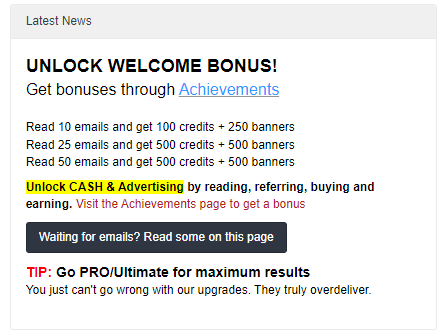
To see all of the achievements you would click on the blue achievements link. There are plenty of surprises waiting for you.
The more you use and promote List Impact, the more rewards you will unlock when you visit the achievements page. You will receive a private message from admin when you achieve something.
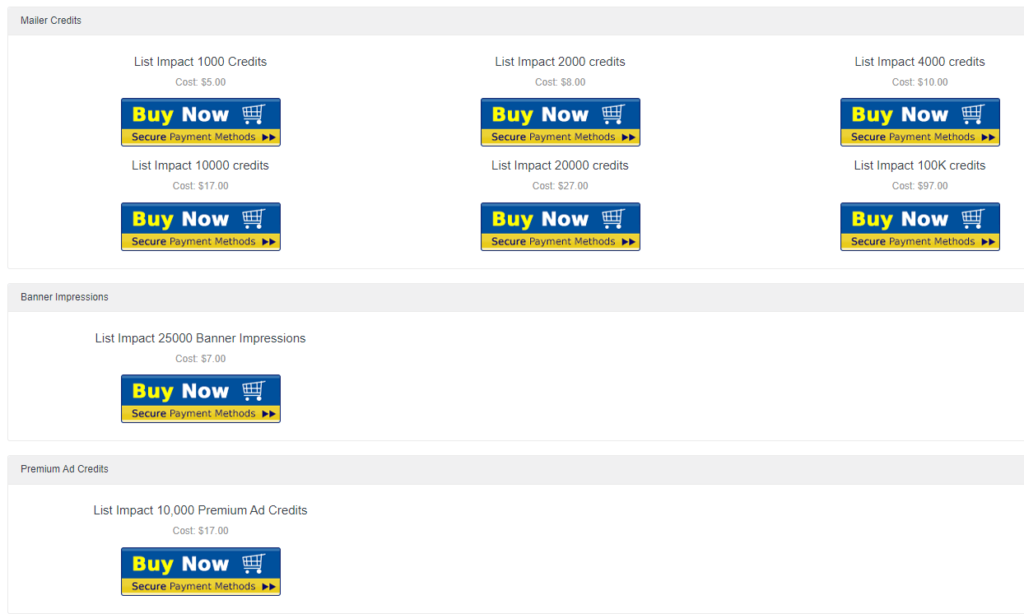
Buy Advertising.
List Impact also allows you to buy advertising if your budget permits.
[Tip…If you are new to internet marketing, or just starting out, I would build some credits up first and send some emails out to test the system. I would also set up some banner ads as these do get a lot of clicks too].
Frequently List Impact has special offers on affiliate marketing systems with huge discounts.
Email History.
Here you can quickly check you email statistics to see what emails’ get the best results. You can also save your emails where you can do a number of things:
- Delete it.
- Edit it.
- Use it to reload again.
Affiliate Tab.
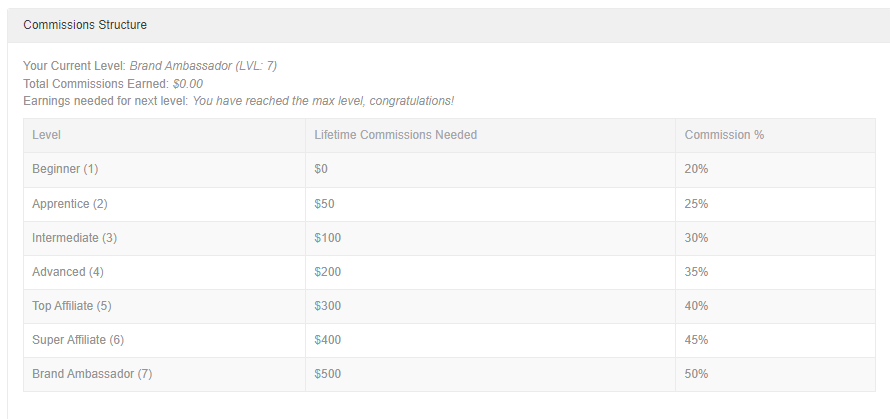
Under this link you can use all your promotional tools, check how many referrals you have, check commission history, transfer credits to affiliates and view the commission structure which is shown in the table below.
Setting Up Your Ads.
List Impact allows you to set up your ads in 3 ways. You can purchase a login ad (which is shown to other members on a daily basis), from 1 day to as many days as you wish.
The cost for a login ad for 1 day is currently $2.50. Payment is made either by coin payments or debit/credit card.
You can add 468×60 banner ads which are shown in the surf area, where members can earn credits. 1 credit – 1 view.
Premium Ads.
This is where you can brand yourself on the members area main page. Excellent exposure! You literally get your face, name banner and text ads shown to thousands of members.
The Downline Builder.
This has 17 mailer sites, 1 traffic exchange and 5 other advertising sites, where you can promote List Impact and get referrals.
Promotional Codes.
The owner of List Impact Kenny Kolijn frequently sends out bonus codes, which you can redeem at no cost for extra credits.
Also look out for Action Codes in Admin emails or inside your members area which you can redeem.
Raffle.
To reward the most active members List Impact has a weekly raffle with some good prizes. All you need to do is read emails and you will be collecting raffle tickets automatically.
If you win a prize , your prize is automatically added to your account as well. Collect raffle tickets all week and see if you have won on Sunday mornings.
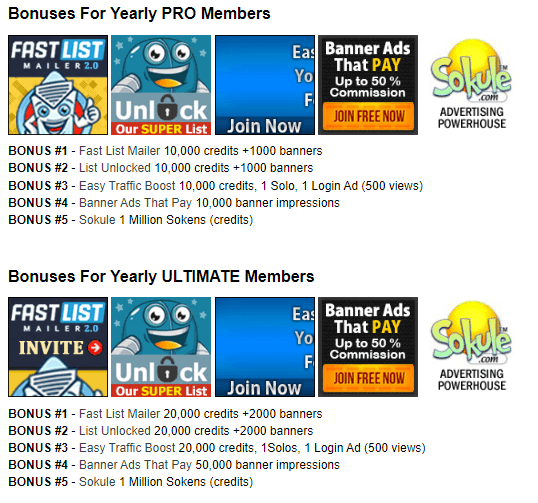
Lifetime Bonuses For Upgraded Members.
This is an excellent package and gives you a MASSIVE amount of advertising for free. Below is a screenshot of all the available extra traffic.
Pros and Cons.
Pros.
- List Impact is completely free to join.
- There is a full quick start guide which is really helpful.
- Sending an email campaign is easy.
- You can save sent emails.
- Upgrades are affordable.
Cons.
- As a free member you can only earn 10 credits per email read.
- As a free member you can only add one 468×60 banner ad.
- As a free member you can only email once every 3 days.
Frequently Asked Questions.
Q. Is List Impact free to join?
A. Yes List Impact is completely free to join.
Q. Can I upgrade?
A. Yes you can upgrade at any time. I would recommend not upgrading at first until you get familiar with the site.
Q. What are the benefits of being a Pro member?
A. The benefits of being a Pro member include the following:
- Pro members earn 20 credits per email read.
- 8 second timer.
- Pro members can add three 468 x60 banner ads.
- Email every 2 days.
- Mailing is UNLIMITED.
- 15,000 monthly bonus credits.
- 1,000 monthly bonus credits.
- 200 monthly bonus premium ad credits.
- 250 referral bonus credits.
- Save up to 10 emails.
- Transfer credits? YES.
- Mass PM referrals? NO.
Q. What are the benefits of being an Ultimate member?
A. The benefits of being an Ultimate member include the following:
- Earn 30 credits per email.
- 6 second timer.
- Email every day.
- Mailing limit UNLIMITED.
- 25,000 monthly bonus mailing credits.
- 1,000 monthly banner impressions.
- 250 monthly bonus premium ad credits.
- 500 referral bonus credits.
- Save up to 20 emails.
- Transfer credits? YES
- Mass PM referrals? YES
Q. Can I cancel my subscription at any time?
A. Yes. You can cancel a subscription at any time, all you have to do is send a support ticket.
Conclusion.
I have been a member of List Impact since 2020, and, having started as a free member. I have had a lot of success with this program. After a few months I took a OTO to the Ultimate lifetime membership for a low one time fee. This is offered quite frequently and means I don’t pay a monthly subscription.
[Tip….look out for this OTO it is worth considering].
Recommendations.
As far as mailers go, List Impact is one of the best ones out there. I receive all the benefits of of the Ultimate membership. This includes 25,000 monthly mailing credits, which means a large number of prospects can be mailed every day.
I Recommend List Impact as a good source of your advertising arsenal.
If you would like to test out List Impact you can join for free by clicking the banner below.

This site may contain links to affiliate websites, and we receive an affiliate commission for any purchases made by you on the affiliate website using such links.

Thanks for your honest review Stu. I found it very informative and I was interested in everything you had to say about Listimpact.com. It made me want to sign up and give it a try.
Hi Phil, thank you for your kind words and taking the time to read the review. I’m glad you found the information useful.